
InnoDB VS MyISAM Database Storage Engine

InnoDB VS MyISAM
The two MySQL storage engines are similar but have some key differences to note.
- InnoDB supports transactions whereas MyISAM does not. Transactions mean multiple data operations can be carried out. These operations include create, update, read and update. This means you can commit and roll back.
- InnoDB can handle large volumes of data better than that of MyISAM. This is partially due to InnoDB supporting transactions, unlike its MyISAM counterpart. However, MyISAM is generally quicker to read data but will not handle the large volumes of data quicker than MyISAM.
- InnoDB supports row locking, whereas MyISAM supports full table locking when the locking option is activated. This row/ table locking ensures only one user can modify data simultaneously.
How to change your MySQL engine
- SQL Statement: You can change the MySQL database engine to MyISAM/ InnoDB by running the following SQL query within the database.
ALTER TABLE `table_name` ENGINE = MYISAM;
ALTER TABLE `table_name` ENGINE = InnoDB;- phpMyAdmin: You can also modify the MySQL database engine to MyISAM/ InnoDB from inside phpMyAdmin
To action this, login to phpMyAdmin and select the database/ tables that you would like to change the MySQL engine of and then select the 'operations' tab in the top right corner. A 'storage engine' field will show and will allow you to modify the storage engine of your database.
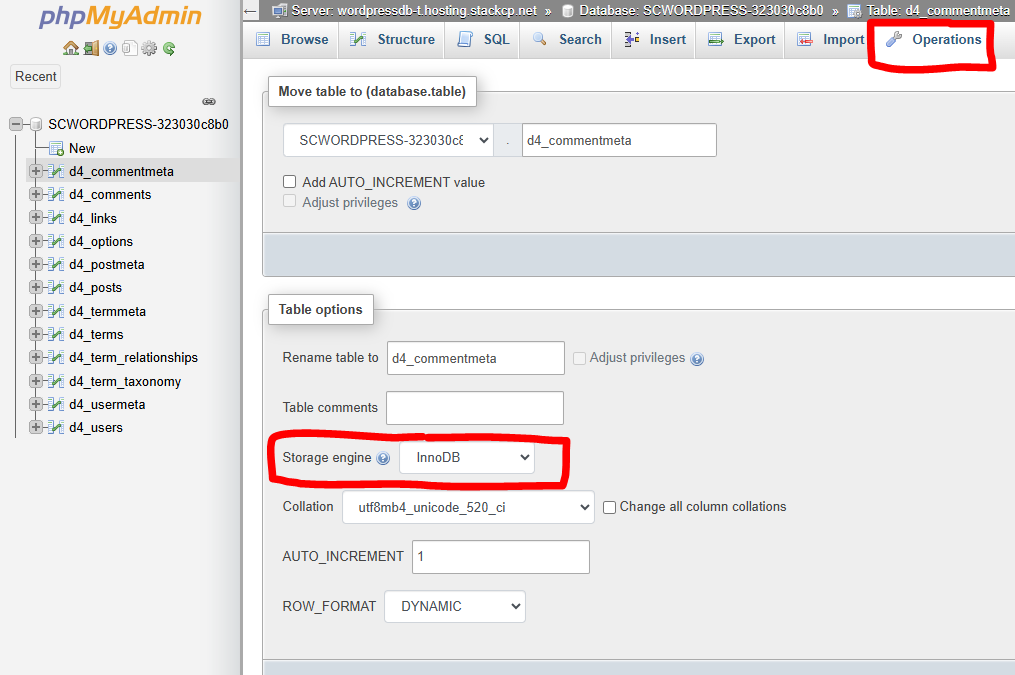
- SQL File edit: This method should only be used when importing a SQL file results in a fatal error. An example of this error is below.
ERROR 1118 (42000) at line 55: Row size too large (> 8126). Changing some columns to TEXT or BLOB may help. In current row format, BLOB prefix of 0 bytes is stored inline.In this example, one of the tables in the database failed to import as it contains too much data for the DB engine it’s trying to import with. To rectify this, we will need to change the MySQL Engine to MyISAM from InnoDB. In this circumstance, opening the SQL file with a text editor locally and locating the create statement by using the line number in the error above. The line in this case is 55.
Once located change the line
ENGINE=InnoDB DEFAULT CHARSET=utf8 COLLATE=utf8_general_ci;

TO

ENGINE=MyISAM DEFAULT CHARSET=utf8 COLLATE=utf8_general_ci;
Once that’s done, resave the SQL file, drop the tables from the DB you were trying to import to, and retry the import. It should go through without issue from there.